
How To View And Clear The Printer Queue In Windows 10?
View And Clear The Printer Queue In Windows 10:
Whenever you print a document in Windows 7, a small printer icon appears in the System Tray. You can view the printer's queue by clicking this icon. You can stop and cancel a print job from the printer queue. With Windows 10, this is different.
No icon displays within System Tray whenever you print a document on just a connected printer. As a result, there doesn't appear to be a mechanism in Windows 10 to view or empty the printer queue. As simple as knowing where and how to look, it's still feasible. You can check and empty the printer queue without connecting the printer to your computer. Here’s how.
The operating system in question is Windows 10. In Windows 10, the Settings app and also the Control Panel are the two locations through which you may change common settings. We'll go over how to View And Clear The Printer Queue In Windows 10 in depth.
Printer Queue – Settings App
Launch the Settings app. Choose the Printers & Scanners tab under the Devices group of options. You may display the list of all the printers that have already been registered to your system here as well as add a new printer.
A printer can be chosen from the list. You must keep track of which printer you are trying to clear the printer queue for if you have several printers added to your system. For valid reasons, each printer's print queues are maintained distinctly.
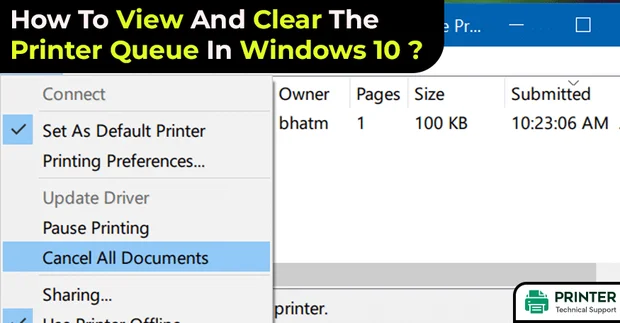
To examine or empty the print queue for a specific printer, select it. Three buttons—Open queue, Manage, and Remove Device—will become visible when it expands. Select "Open queue" from the menu.
The list of all papers waiting to be printed will appear in a new window. You can view the documents that have been printed and those that are awaiting printing.
To stop printing a document, choose "Cancel" from the context menu when you right-click on it.
Printer Queue – Control Panel
Switch to the Control Panel. Select Devices and Printers under Hardware or Sound. Right-click the printer you wish to examine the queue for under the Printers section. 'See what's printing' can be chosen from the context menu.
The printer queue pane displayed by the Settings app will be identical for you. To stop printing a document, right-click it and choose "Cancel" from the context menu.
Getting Rid Of A Print Job From The Printer Cache
Frequently, even after you cancel a print job from your desktop, your printer keeps printing it. Print jobs that were sent to the printer experience this. Since printer technology is still somewhat dated and cumbersome, the printer must preferably not publish the document.
Unplug the printer from your system if you've rejected a print job from your desktop but it continues to print. Wait ten minutes after turning off the printer. It needs to be cleared when you turn it back on. Before re-connecting the printer to your PC, let it fully boot up.
- SAM
 Brand: Hp Printer
- Last Update: 3 hours ago
 Related Articles
Top Searches in Hp Printer
Featured Articles
How to Get Canon Printer Online on MAC?
Sep 22, 2026
How to Fix Printer Printing Horizontal Black Lines?
Sep 22, 2026
How to Scan from HP Printer to Computer Windows 10?
Sep 22, 2026
Ricoh Printer Stuck on Processing
Sep 22, 2026
Brother Printer Only Printing in Black and White
Sep 22, 2026
How to Clean Kodak Printhead?
Sep 22, 2026
How to Install Lexmark Printer to Computer Without CD?
Sep 22, 2026
Why My Samsung Printer is Not Printing Clearly?
Sep 22, 2026
Top Questions
Why Won't My Canon Printer Print after Changing an Ink Cartridge?
Sep 22, 2026
How do I Fix a Canon Printer 1403 Error?
Sep 22, 2026
How do I Connect My Canon MG3050 Printer to WiFi?
Sep 22, 2026
How to Change Printer from Offline to Online Canon?
Sep 22, 2026
How to Turn My Ricoh Printer Online from Offline?
Sep 22, 2026
Brother MFC Printer Won't Print Black Despite Full Ink Cartridges
Sep 22, 2026
How to Fix Epson Printer Filter Failed or Stopped on Mac Error?
Sep 22, 2026
How do You Get a Lexmark Printer Back Online?
Sep 22, 2026
Categories
Article Article Article Article Article Article Article Article Article Article